The Automated House Flipping Expense Tracker
The old-school shoebox method is dead. Build your project's expense history while you're still on-site. Track every dollar, log staged trade payments, and digitize receipts on the go with our premier renovation cost tracking software.
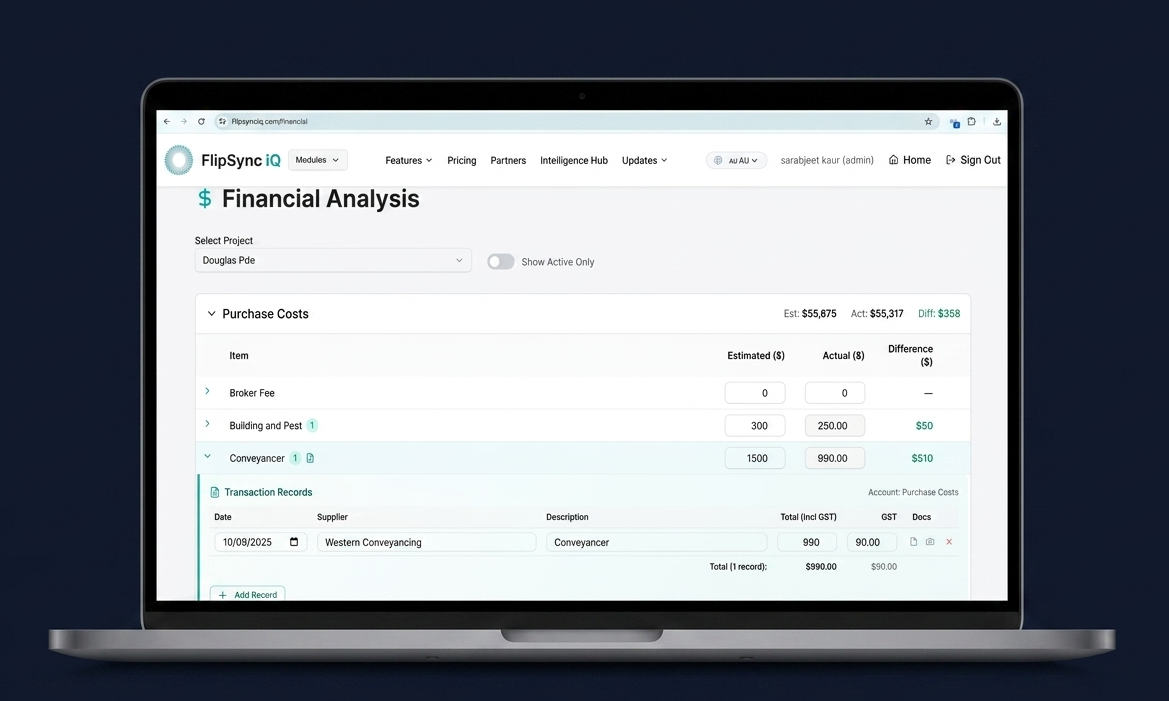
Each Cost Item. Multiple Transactions.
The Ultimate Renovation Cost Tracking Software.
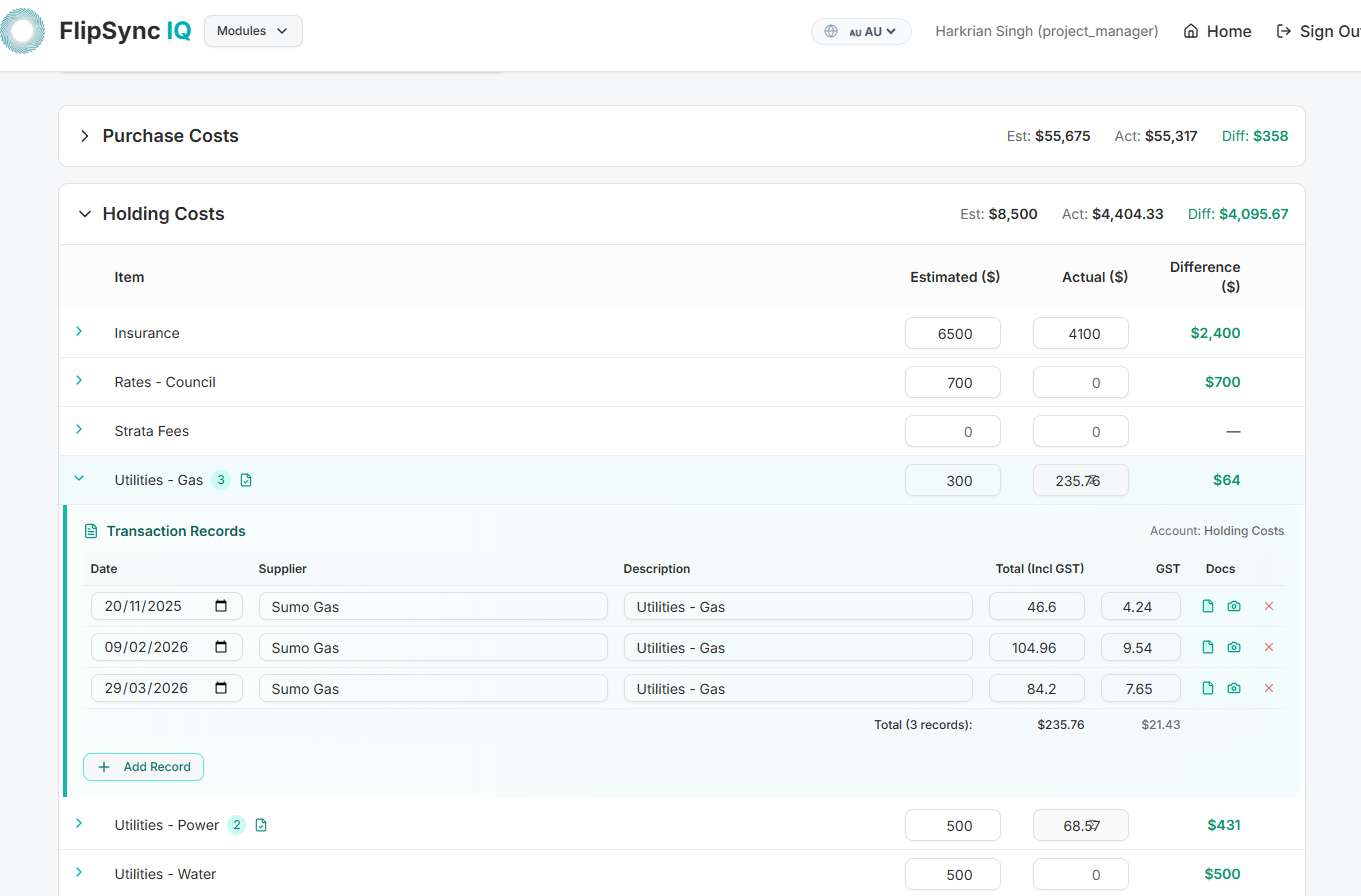
Property renovations rarely happen in one transaction and we get it. Our app handles staged payments- record multiple payments against a single cost item with ease.
- Record dates, suppliers, and descriptions per payment
- Auto-populate GST (with manual override control)
- Real-time balance updates against your feasibility
- Clear 'Account' mapping for easier EOFY reporting
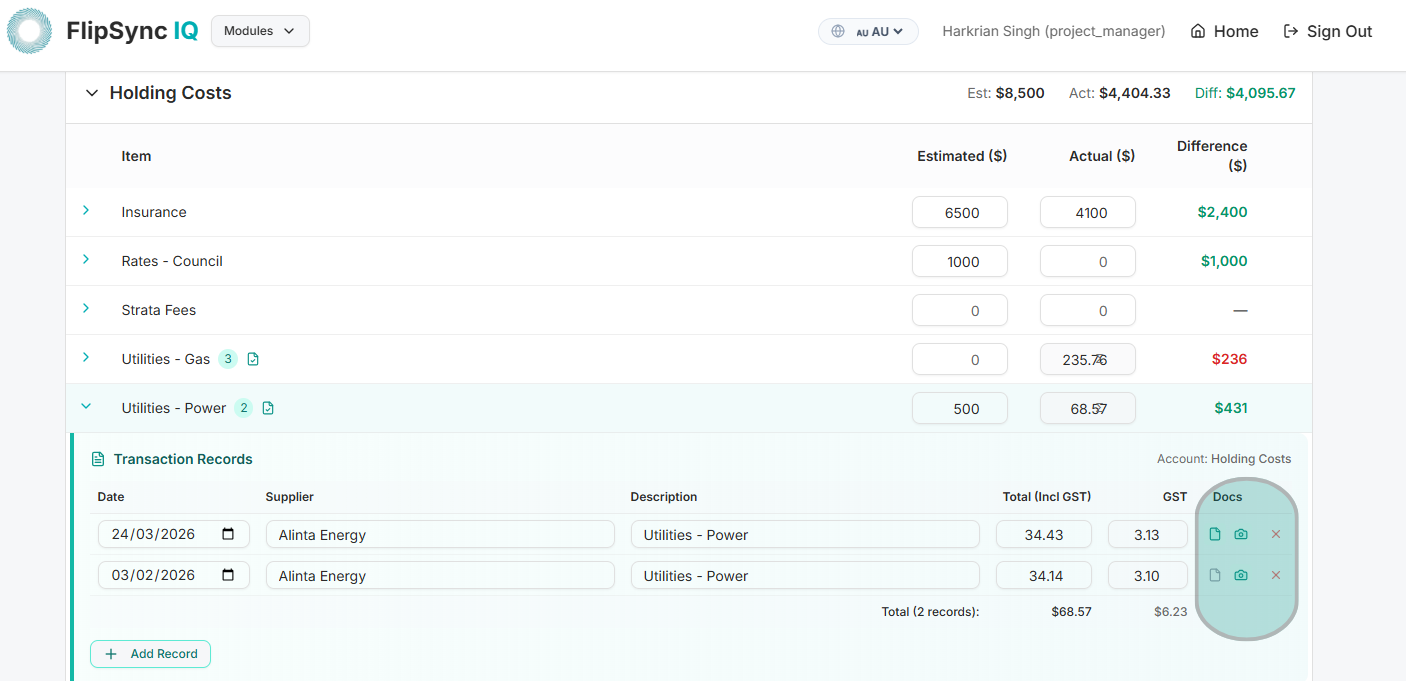
Attach Invoices
On The Fly.
Never lose a tax deduction to a faded receipt again. Functioning as a premier expense management tool for property investors, FlipSync IQ ensures your records stay linked to the exact expense item. Whether you're standing at the Bunnings or Home Depot counter, or paying a trade from your laptop, securely upload digital invoices and photo receipts for a bulletproof, audit-ready trail.
Mobile Capture
Snap and upload invoices and receipts directly from your phone.
Invoice Vault
Keep invoices organized and ready for your accountant.
How the House Flipping Expense Tracker Works
From the first deposit to the final invoice, every dollar you spend on a flip is logged against the budget line it belongs to. Here is the four-step flow.
1. Set your budget lines
Start from your feasibility. Every cost item, from acquisition and trades to fees and holding costs, becomes a budget line on the project.
2. Log payments as they happen
Record deposits, progress payments and final invoices against the right line item, with the GST component calculated for you.
3. Snap the receipt
Photograph receipts on site or upload invoices from your laptop. Each document is stored with the transaction it belongs to.
4. Watch budget vs actual
See spend against budget on every line with red and green indicators, so you catch an overrun before the next payment goes out.
Track Every Fee,
Not Just the Renovation.
Trades and materials are only part of what a flip costs. The fees around the deal, and the holding costs that grow every week you own the property, are where margins quietly disappear.
FlipSync IQ lets you log these costs in the same place as your renovation spend, so your numbers reflect the full cost of the project. Want to see what they do to your margin before you buy? Model them up front with our house flipping budget tool.
Agent & selling fees
Agent commission, marketing and styling costs logged against the sale, not lost in a separate spreadsheet.
Council & permit fees
Development applications, permits and inspection fees tied to the stage of works they belong to.
Finance & holding costs
Loan interest, rates, insurance and utilities recorded as they fall due, so a schedule slip shows up in dollars.
Legal & conveyancing
Conveyancing, settlement and legal fees on both the purchase and the sale, captured with their invoices.
Deep Dive: Renovation & Design
Learn how to track costs and manage budgets with our expert investment guides.
Kitchen Renovation Cost Australia 2026: What Flippers Spend
How much should a flipper spend on a kitchen in Australia? Set a 2%, 3% or 4% ceiling from your ARV, compare six published cost guides, price four kitchen scopes with contingency and check the engineered stone rule before you get a quote.
Property Flipping in Australia: The Cosmetic Renovations for Profit Worksheet
Do cosmetic flips pay in Australia? Run paint, flooring, kitchen, bathroom and kerb appeal through a five-part worksheet: scope cost, break-even hurdle, published ROI claims, the street gap test and a PASS, TRIM, CAP or SKIP stamp for every line.
Property Flipping: Renovation Decisions That Protect Margin
Your flip profit is set at purchase, not at paint colour. See the renovation decisions, over-improving traps, and financing options that protect your margin.
Comparing tools? See our 2026 rankings of the best real estate investment software in Australia and the best house flipping software.